Programming
Linux Thin Client Operating System: Buyer’s Guide
A practical guide to choosing a linux thin client operating system for secure, manageable endpoint fleets across VDI, kiosks and remote work.

Anika Rukhsar
Founder
Oct 12, 2026
10 min read
A linux thin client operating system is a lightweight, security-focused endpoint platform built to connect users to centrally managed applications, virtual desktops, browser-based tools, or kiosk workflows. For most businesses, it is a strong fit when you want lower endpoint complexity, tighter lockdown, and easier fleet management than a general-purpose desktop OS. The right choice depends less on the label “thin client” and more on whether the platform supports your hardware, identity model, management workflow, and user experience under real conditions.
Key takeaways
- A linux thin client operating system is a lightweight, locked-down OS designed to securely connect endpoints to centrally managed apps, desktops, and sessions.
- For business use, the most important evaluation criteria are hardware compatibility, centralized management, security controls, offline behavior, and support for your access stack such as RDP, VDI, browser apps, or kiosks.
- The right thin client platform reduces endpoint complexity, but only if image updates, policy enforcement, certificate handling, and fleet monitoring are designed from the start.
- Pilots should test real peripherals, network edge cases, identity flows, and recovery procedures, because these operational details usually determine deployment success more than feature lists do.
- Typical projects range from a fast proof of concept in a few weeks to a multi-site rollout over several months, depending on hardware diversity, compliance needs, and management tooling.
What a linux thin client operating system actually does
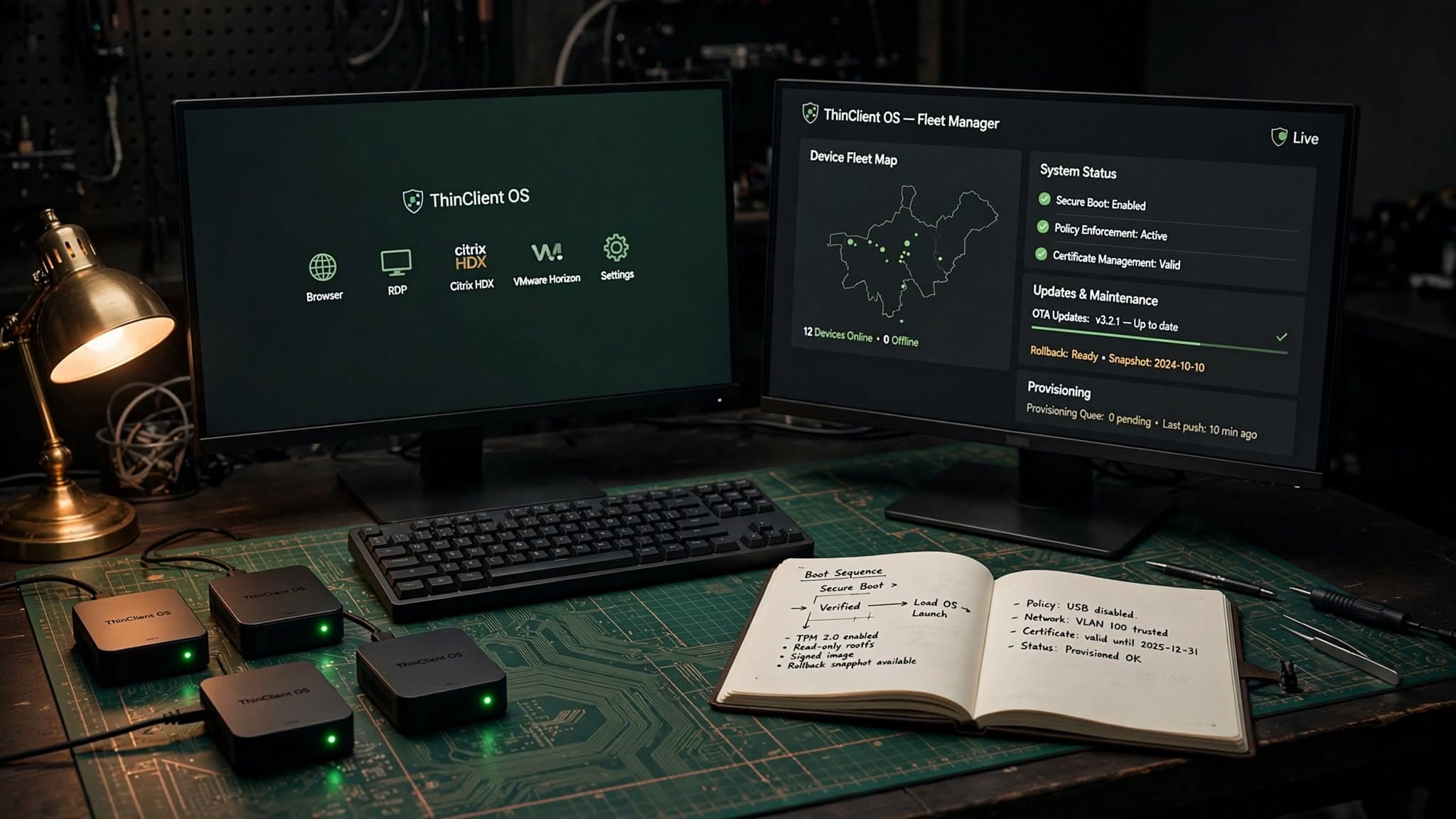
At a technical level, a thin client OS strips the endpoint down to the components needed for secure access and device control. Instead of treating each PC like a full independent workstation, it treats the endpoint as a managed access node. That usually means a minimal Linux base, read-only or controlled filesystem behavior, hardened boot, restricted local apps, and purpose-built clients for protocols such as RDP, Citrix HDX, VMware Horizon, browser-based SaaS, SSH, or VNC.
For business leaders, the key benefit is not “Linux” by itself. It is operational simplicity. A well-designed thin client stack can let IT provision a device with a known-good image, apply policies centrally, rotate certificates, push updates in waves, and recover devices quickly after failure or misconfiguration. In environments like call centers, shared desks, healthcare stations, logistics terminals, retail kiosks, and remote branch offices, that model often makes more sense than managing a full desktop OS on every endpoint.
A proper implementation normally includes more than the endpoint image. You should expect pieces such as:
- Secure boot and device startup controls
- Central policy management and configuration profiles
- Remote updates with rollback options
- Peripheral handling for printers, scanners, webcams, headsets, and smart cards
- Identity integration with Azure AD, Active Directory, LDAP, SAML, or OIDC-connected services
- Logging, health checks, and fleet visibility
When a linux thin client operating system is the right fit
Thin clients are most effective when most user work already lives somewhere else: in a virtual desktop, published application, browser, containerized workspace, or remote session. If your teams mainly use Microsoft 365, Google Workspace, ERP screens, customer service tools, CRM, internal web apps, and remote desktops, then a lightweight endpoint can be a practical choice. It reduces the attack surface and keeps local drift to a minimum.
Typical business scenarios include:
- VDI or DaaS environments using Microsoft, Citrix, VMware, or Azure Virtual Desktop
- Kiosk and digital signage deployments with locked-down browser sessions
- Shared workstations in healthcare, education, manufacturing, and warehouses
- Secure contractor access where data should not persist locally
- Branch office terminals where onsite IT support is limited
It is not always the right answer. If users need heavy local processing for video editing, CAD, offline engineering tools, or broad USB device support with custom drivers, a thin client approach can create friction. The same is true when business apps assume full desktop admin rights, persistent local storage, or deep kernel-level integrations. In those cases, a thin client may still fit some roles, but probably not all.
A good rule is simple: choose thin clients when centralized control matters more than endpoint flexibility. If endpoint flexibility is the priority, a managed desktop may be a better pattern.
Core capabilities to evaluate before you commit
Decision-makers often compare products by screenshots and licensing, but deployment success usually depends on a smaller set of technical realities. Start with hardware support. Verify chipsets, Wi‑Fi adapters, GPU behavior, display outputs, audio devices, docking stations, touchscreens, and USB peripherals on the actual models you plan to deploy. Linux thin clients can run beautifully on the right hardware and become expensive to support on the wrong hardware.
Next, evaluate protocol and workspace support. If your environment relies on Microsoft Remote Desktop, check codec support, multi-monitor handling, Teams optimization, printer redirection, smart card login, and webcam pass-through. If you use Citrix, verify HDX features. If you depend on browser apps, test Chromium-based policies, kiosk mode behavior, certificate trust chains, and media acceleration. If you need zero trust access, confirm compatibility with your chosen identity and secure access stack.
The most important capabilities to verify are usually:
- Central management: image deployment, profile assignment, staged rollouts, and remote troubleshooting
- Security: disk encryption, secure boot, device attestation, certificate management, firewall policy, and USB control
- Resilience: watchdogs, rollback, offline startup behavior, local cache policy, and remote recovery options
- User experience: boot time, login flow, monitor support, audio/video quality, and peripheral reliability
- Observability: logs, device inventory, policy status, update status, and alerting hooks
This is also where hidden complexity appears. For example, kiosk deployments often fail not because the browser cannot launch, but because captive portals, expired certificates, power management, display sleep, or unattended reboots were not handled. In our experience, the “small operational details” decide whether a fleet feels effortless or fragile.
Security, compliance, and lifecycle management
Security is one of the strongest reasons to adopt a thin client strategy, but only if the design goes beyond simply removing applications. A secure linux thin client operating system should limit what runs, control what persists, and prove what changed. Common patterns include read-only root filesystems, signed images, measured boot, privilege separation, minimal packages, strict outbound rules, and device-specific certificates. These are practical controls, not just architecture diagrams.
For regulated environments, ask how the platform handles local data exposure. Does the device store credentials, browser cache, temp files, logs, or downloaded documents? Can local media be disabled or selectively allowed? How are secrets provisioned and rotated? What evidence can your team collect for audits, incident response, or asset reviews? These questions matter in finance, healthcare, public sector, and any business handling sensitive customer information.
Lifecycle management deserves equal attention. Endpoint fleets age. Hardware revisions change. Certificates expire. Root CAs rotate. Browsers deprecate APIs. VDI clients release compatibility updates. A workable strategy usually includes:
- Versioned base images with clear promotion paths from dev to pilot to production
- Over-the-air updates with canary groups and rollback
- Policy as code or at least policy version control
- Routine certificate and trust store maintenance
- Defined end-of-life plans for hardware and OS branches
When we built ThinClient OS + Fleet Manager, one lesson was that fleet operations matter as much as the image itself. A stable endpoint becomes far more valuable when administrators can see device state, apply policies consistently, and recover from bad updates without touching every desk.
A practical decision framework for buyers
If you are evaluating vendors or deciding whether to build, customize, or buy, use a step-by-step framework instead of a feature checklist alone. Start by mapping user groups. A call-center agent, a warehouse terminal, an executive hot desk, and a public kiosk have different risk profiles and support needs. Segment them before discussing products.
Then walk through this decision sequence:
- Define the primary access model. Is the endpoint mainly for browser apps, RDP, Citrix, VMware Horizon, SSH, or a mixed environment?
- Lock the hardware shortlist. Choose 2-4 approved device models and test only those first.
- Identify identity and security dependencies. Include MFA, certificate login, SSO, zero trust, proxy rules, and network segmentation.
- Document peripheral needs. Printers, scanners, smart cards, cameras, microphones, barcode readers, and specialized USB devices change the answer quickly.
- Decide your management model. Do you need cloud management, on-prem control, air-gapped updates, or hybrid administration?
- Run a pilot with real users. Simulate poor Wi‑Fi, monitor swaps, password resets, expired certs, and failed updates.
- Estimate support ownership. Clarify who owns image maintenance, package updates, policy drift, and compatibility testing.
For many organizations, there are three viable paths. First, adopt a commercial thin client platform if your requirements are standard and speed matters most. Second, customize an existing Linux base if you need tighter integration, branding, or specialized policy controls. Third, build a purpose-driven endpoint and management layer when the fleet is strategic, the environment is unusual, or compliance and hardware control require it. The right path depends on internal capability and how differentiated your endpoint experience needs to be.
Costs, timelines, and common pitfalls
Business buyers usually ask two questions: how much will it cost, and how long will it take? The honest answer is that thin client projects vary more by complexity than by device count alone. A limited proof of concept on known hardware can often be done in a few weeks. A production rollout with multiple device types, management tooling, SSO, certificate workflows, and VDI optimization often takes several weeks to a few months. Large multi-site programs can take longer, especially when procurement, networking, and security reviews are involved.
Cost also has layers. There is the endpoint software itself, but also management tooling, engineering time, testing, support processes, and pilot iteration. If you compare thin clients only against desktop license cost, you will miss the operational side. If you compare them against the cost of supporting unstable or overpowered endpoints across many sites, the thin client model often becomes easier to justify.
The most common pitfalls are predictable:
- Choosing hardware before confirming Linux driver stability
- Assuming all USB peripherals will behave the same through remote sessions
- Ignoring certificate lifecycle and trust store management
- Running a pilot with ideal network conditions instead of real branch conditions
- Treating updates as one-off events instead of a governed release process
- Failing to define ownership between infrastructure, security, EUC, and help desk teams
You can avoid most of these by making the pilot operationally realistic. Test cold boot, password reset, monitor hot-plugging, remote wipe, offline startup, VPN or proxy changes, and rollback after a failed image. If those scenarios work cleanly, the glossy parts usually work too.
Build vs buy, and what good implementation looks like
There is no universal winner between buying an off-the-shelf thin client platform and building a tailored one. Buying is often faster, lowers initial engineering effort, and works well for common enterprise patterns. Building or deeply customizing makes sense when you need a specific kiosk flow, a branded device experience, unusual peripherals, strict compliance behavior, or unified control across endpoint, cloud, and internal systems.
A strong implementation has a few consistent traits. The endpoint image is intentionally small. Policies are centralized and versioned. Hardware support is constrained to approved models. Authentication is aligned with the broader enterprise identity strategy. Updates are staged. Logs are accessible. Recovery does not depend on physically touching every device. Those qualities matter more than whether the stack uses Ubuntu Core, Debian, Yocto, Fedora IoT, Chromium kiosk mode, FreeRDP, an MDM layer, or a custom fleet agent.
For organizations evaluating a partner, look for practical engineering maturity rather than marketing claims. Ask how they validate kernel and driver compatibility, how they handle secure image delivery, how they design rollback, what telemetry they collect, how they isolate customer-specific customizations, and how they support long-term maintenance. At eSparks, we have found that the best thin client outcomes come from treating the endpoint as part of a wider platform: identity, cloud, networking, DevOps, security, and support operations all need to fit together.
A linux thin client operating system can be an excellent business decision when the goal is secure, predictable, centrally managed access. But success depends on disciplined design: approved hardware, realistic pilots, strong fleet operations, and a support model that matches the business. Get those pieces right, and thin clients stop being “lightweight desktops” and become a reliable delivery layer for modern work.
Frequently Asked Questions
What is a linux thin client operating system?
A linux thin client operating system is a lightweight Linux-based endpoint platform designed mainly to connect users to centrally managed applications, desktops, or browser sessions. It prioritizes security, lockdown, and centralized administration over broad local computing features.
Is a linux thin client operating system secure enough for business use?
Yes, it can be very secure when implemented with controls such as signed images, secure boot, restricted local storage, certificate-based trust, limited packages, and centralized policy management. Security depends on the full operating model, not just the base OS.
When should a company choose thin clients instead of full desktops?
Thin clients are usually the better fit when most work happens in VDI, DaaS, web applications, kiosks, or remote sessions and the business wants tighter endpoint control. Full desktops are often better when users need heavy local processing, broad device support, or frequent offline work.
How long does a thin client rollout usually take?
A small proof of concept on known hardware can often be completed in a few weeks, while a production rollout with security, identity, and management integration typically takes several weeks to a few months. The main drivers are hardware diversity, peripheral complexity, and governance requirements.
Work with eSparks IT Solutions
Planning a project around this? We help businesses across the USA, UK, Canada, Australia and the GCC ship it. See how we work with clients in the USA. See a related project: ThinClient OS + Fleet Manager. Explore our Programming services and portfolio, estimate your project cost, or book a free call.
Related development services

Anika Rukhsar
Founder
Passionate technology writer and industry expert with years of experience in software development, cloud computing, and digital transformation. Dedicated to sharing insights and helping developers stay ahead of the curve.
Related Topics
Continue Reading
More insights in Programming
Programming
Endpoint Fleet Management Software: Buyer’s Guide
Learn how to evaluate endpoint fleet management software for security, patching, compliance, automation, and long-term IT operations.
Oct 13, 2026
Read More
Programming
Thin Client Management Software: A CTO Buyer’s Guide
Learn how to evaluate thin client management software for security, updates, VDI access, device control, and long-term operating cost.
Oct 11, 2026
Read More
Programming
How to Import Tally Data Into New Accounting Software
Learn how to import tally data into new accounting software with a practical migration plan, risks, tools, timelines and validation steps.
Oct 10, 2026
Read MoreReady to Transform Your Business?
Let's discuss how our expertise can help you achieve your goals