
Cloud Computing
How to Migrate to the Cloud UK Without Disruption
Planning to migrate to the cloud UK? Learn the right migration strategy, security controls, timelines, costs and pitfalls for business-critical systems.

Tauseef Alam
Chief Technology Officer
Aug 7, 2026
9 min read
If you want to migrate to the cloud UK, the safest approach is to begin with a clear inventory of applications, data and dependencies, then choose the right migration path for each workload rather than moving everything the same way. For most organisations, a successful cloud move means building a secure landing zone first, prioritising low-risk systems, and treating migration as a business and operating-model change, not only an infrastructure project.
Key takeaways
- To migrate to the cloud UK safely, start with application discovery, dependency mapping, data classification and a clear target architecture before moving any workloads.
- The right cloud migration strategy varies by system: some workloads should be rehosted quickly, while others need refactoring, replacement or retirement.
- Security, identity, backup, logging and cost controls should be designed into the landing zone before production workloads are migrated.
- A realistic cloud migration timeline ranges from a few weeks for a small, well-understood workload to several months for regulated, integrated or legacy estates.
- Cloud migration succeeds when technical decisions are tied to business outcomes such as resilience, delivery speed, compliance and predictable operating costs.
Why businesses move now, and what “success” really means
For UK businesses, cloud migration is rarely just about leaving on-premises servers behind. Decision-makers usually start because of one or more business pressures: ageing infrastructure, long release cycles, data centre exit deadlines, security concerns, scaling demands, remote work requirements, or the need to modernise customer-facing products. In practice, the most valuable outcome is not merely “being in the cloud”; it is having systems that are easier to maintain, recover, secure and improve.
A useful way to define success is to set outcomes before you touch production. Common goals include improving resilience, reducing deployment friction, enabling faster product delivery, strengthening disaster recovery, or making costs more transparent. If those outcomes are not defined, cloud migration can drift into a lift-and-shift exercise that reproduces old problems on new infrastructure.
Business leaders should also recognise that cloud does not automatically mean lower cost. Some workloads become more efficient in AWS, Microsoft Azure or Google Cloud; others become more expensive if they are overprovisioned, left running unnecessarily, or moved without redesign. The stronger case for cloud is usually agility, resilience and access to managed services such as Kubernetes, managed databases, object storage, serverless compute, observability and AI tooling.
How to migrate to the cloud UK: a practical decision framework
The most reliable migration programmes follow a repeatable decision process. Before choosing tools or providers, work through the workload portfolio in a structured way.
-
Define business drivers and non-negotiables. Clarify what matters most: speed, resilience, compliance, cost visibility, global delivery, or faster product releases. For UK organisations, non-negotiables often include GDPR, UK data residency requirements, Cyber Essentials expectations, auditability, and sector-specific rules.
-
Discover what you actually run today. Create an inventory of applications, servers, databases, integrations, batch jobs, APIs, file shares and third-party dependencies. Map which systems talk to each other, when they exchange data, and what breaks if one component moves before another. This step often reveals forgotten cron jobs, hard-coded IP addresses, legacy Windows services or reporting pipelines that would otherwise fail after migration.
-
Classify each workload by criticality and complexity. A customer portal, ERP database and internal test environment should not be treated the same way. Group workloads by business importance, data sensitivity, performance profile, licensing constraints and recovery requirements such as RPO and RTO.
-
Choose a migration strategy per workload. The classic categories still work well:
- Rehost: move as-is, typically using virtual machines or managed migration services.
- Replatform: make limited changes, such as moving from self-managed SQL Server to Azure SQL Managed Instance or Amazon RDS.
- Refactor: redesign parts of the application for cloud-native services, containers or microservices.
- Repurchase: replace custom or legacy software with SaaS.
- Retire: switch off what no longer delivers value.
- Retain: keep some systems on-premises or in a private environment for now.
-
Build the target architecture and landing zone. This includes identity, network design, logging, key management, tagging, backup, monitoring, patching, policy controls and budget guardrails. Skipping this stage is one of the most common causes of messy, insecure cloud estates.
Assessing applications, data and dependencies before migration
The discovery phase is where good migration planning earns its keep. Start with dependency mapping: web front ends depend on APIs, APIs depend on databases, databases may depend on file shares, message brokers or scheduled imports. Tools can help, but interviews with application owners and operations teams are still essential because undocumented dependencies are common.
Pay particular attention to data. Classify datasets by sensitivity, retention, residency and access patterns. Personal data, financial records, healthcare information and intellectual property all require different controls. In UK and cross-border operating models, you may need to consider where data is stored, where backups are replicated, who can administer the environment, and how audit logs are retained. Encryption at rest and in transit is baseline, but equally important are key management, privileged access design and data lifecycle rules.
It is also worth identifying technical blockers early. Typical examples include:
- Legacy applications tied to unsupported operating systems
- Software licensed to physical hardware or fixed environments
- Databases with extremely high IOPS or low-latency requirements
- Large file transfer processes built around local network assumptions
- Hard-coded SMTP, DNS or IP configuration
- Identity models that do not integrate cleanly with Azure AD, Entra ID, Active Directory, Okta or similar providers
A practical output from assessment is a migration wave plan. Wave 1 might include lower-risk internal tools, development environments or stateless web applications. Later waves can include databases, business-critical applications and heavily integrated systems once the landing zone, runbooks and rollback approach have been proven.
Choosing the right target architecture and platform
Most UK organisations evaluating cloud will compare Azure, AWS and sometimes Google Cloud, with the final choice influenced by current Microsoft licensing, internal skill sets, required managed services, integration needs and governance preferences. There is no universal winner. Azure is often attractive for Microsoft-centric estates using Windows Server, SQL Server, Entra ID and Microsoft 365. AWS is frequently chosen for breadth of services, strong infrastructure flexibility and mature ecosystem support. Google Cloud can be compelling for data, analytics and container-led platforms.
The larger architectural question is not only provider choice, but operating model. Some workloads fit well on IaaS virtual machines. Others are better on PaaS and managed services because managed databases, managed Kubernetes, object storage, queues and serverless functions reduce operational burden. For example, a .NET web app running on a pair of Windows VMs can often be replatformed onto Azure App Service with Azure SQL, while a Node.js or Java service may suit containers on Kubernetes or a serverless pattern depending on traffic and runtime needs.
Hybrid architecture is also common, especially where there are factory systems, specialist hardware, latency-sensitive applications or phased exits from private data centres. In these cases, secure connectivity matters: VPNs, dedicated links such as Azure ExpressRoute or AWS Direct Connect, segmented networks, private endpoints and clear routing rules are critical. If you expect multi-cloud, be careful not to force it without a business reason. Multi-cloud increases governance and operational complexity, so it should be justified by resilience, regulatory separation, customer requirements or specific platform strengths.
Security, compliance and operational readiness
Security should be designed before migration, not retrofitted after go-live. A strong cloud landing zone typically includes identity federation, role-based access control, least privilege, multi-factor authentication, central logging, SIEM integration, vulnerability management, policy enforcement and secrets management. Services such as Azure Key Vault, AWS KMS and Secrets Manager, Microsoft Defender for Cloud, AWS Security Hub and cloud-native audit logging are useful building blocks, but they still need design discipline.
For UK businesses, governance usually intersects with GDPR, supplier risk management, retention policies, sector rules and internal audit requirements. That means documenting who can access what, where data is stored, how backups are protected, how incidents are handled and how changes are approved. If you process regulated data, speak to compliance and legal stakeholders early rather than assuming the technical team can decide everything later.
Operational readiness is equally important. Before production cutover, confirm that the team can actually run the new environment. That includes:
- Monitoring and alerting with tools such as Azure Monitor, CloudWatch, Datadog, Grafana or Prometheus
- Backup and restore testing, not just backup configuration
- Patch and image management for VMs and containers
- Disaster recovery runbooks and failover procedures
- Incident response ownership and escalation paths
- Cost monitoring, budgets and tagging standards
- Infrastructure as code using Terraform, Bicep, ARM or CloudFormation
In our experience at eSparks, migrations go more smoothly when platform engineering, security and application teams agree on these controls up front. It avoids the common pattern where applications are moved quickly but the operating team inherits an estate that is hard to secure, expensive to observe and difficult to support.
Typical costs, timelines and delivery approach
The question most leadership teams ask early is, “How long will this take, and what will it cost?” The honest answer is that it depends on estate complexity, not just server count. A small migration involving a few low-dependency applications might take a few weeks from assessment to production cutover. A mid-sized estate with several line-of-business systems, directory integration, reporting dependencies and a formal testing cycle often takes a few months. Larger programmes, especially those involving ERP, regulated data or extensive refactoring, can run longer and are best split into phased releases.
Cost also has multiple layers. There are one-off costs for discovery, architecture, landing zone setup, migration engineering, testing and change management. Then there are ongoing run costs for compute, storage, networking, backups, observability, security tooling and support. Typical estimates often improve when teams right-size compute, shut down non-production environments out of hours, move archive data to lower-cost storage tiers, and use reserved capacity or savings plans where workload patterns are predictable.
A disciplined delivery model usually looks like this:
- Assessment and business case
- Landing zone and governance setup
- Pilot migration of one or two lower-risk workloads
- Remediation of lessons learned
- Wave-based migration by priority and dependency group
- Validation, optimisation and operational handover
This phased approach reduces risk compared with a big-bang migration. It also gives stakeholders real evidence about performance, effort and supportability before more critical systems are moved.
Common pitfalls that cause disruption, and how to avoid them
Many cloud projects struggle for reasons that are predictable. The first is assuming all applications can be lifted and shifted with minimal change. Some can. Many cannot, especially where storage, latency, authentication or batch processing assumptions are tightly bound to the old environment. Avoid this by assessing application behaviour, not only infrastructure shape.
The second pitfall is weak dependency mapping. Teams migrate the visible application server but overlook reporting databases, print services, SFTP jobs, middleware, certificate chains or firewall rules. The result is a migration that appears successful until users start their real workflows. Dependency workshops, traffic analysis and rehearsed cutover plans reduce this risk significantly.
The third is underestimating operating model change. Cloud requires new habits: infrastructure as code, immutable deployments where possible, shared responsibility for security, active cost governance and stronger observability. If teams keep managing cloud like a traditional server room, they lose much of the value and may create new risks.
Finally, avoid treating migration as finished on cutover day. The first 30 to 90 days after go-live matter because this is when rightsizing, policy tuning, performance adjustments, backup validation and security hardening usually happen. A practical post-migration checklist includes reviewing idle resources, validating alert quality, checking patch baselines, confirming recovery tests and tuning autoscaling or database sizing. That optimisation phase is often where the cloud estate starts to feel intentionally engineered rather than merely relocated.
Frequently Asked Questions
What is the safest way to migrate to the cloud UK?
The safest way to migrate to the cloud UK is to begin with application discovery, dependency mapping, data classification and a secure landing zone before moving production workloads. Most organisations reduce risk by migrating in waves, starting with lower-risk systems and validating backup, monitoring, security and rollback procedures before critical cutovers.
How long does a cloud migration usually take for a UK business?
A cloud migration can take a few weeks for a small, low-complexity workload or several months for integrated, regulated or legacy environments. The timeline depends more on application dependencies, testing requirements, security controls and data migration complexity than on the number of servers alone.
Is lift-and-shift the best option when moving to cloud?
Lift-and-shift is useful for some workloads because it can reduce migration time and operational disruption, but it is not always the best long-term option. Applications with scaling, resilience, licensing or maintenance issues often benefit more from replatforming, refactoring or replacement with managed services or SaaS.
What should UK businesses check for compliance during cloud migration?
UK businesses should review GDPR obligations, data residency expectations, access control, encryption, audit logging, retention policies, backup handling and incident response processes during cloud migration. If the organisation operates in a regulated sector, it should also confirm supplier controls, administrative access models and evidence required for audits before go-live.
Work with eSparks IT Solutions
Planning a project around this? We help businesses across the USA, UK, Canada, Australia and the GCC ship it. Explore our Cloud Computing services and portfolio, estimate your project cost, or book a free call.
Related cloud & DevOps services

Tauseef Alam
Chief Technology Officer
Passionate technology writer and industry expert with years of experience in software development, cloud computing, and digital transformation. Dedicated to sharing insights and helping developers stay ahead of the curve.
Related Topics
Continue Reading
More insights in Cloud Computing

Cloud Computing
Mysql to Postgresql Migration Service: UK Decision Guide
A practical UK guide to choosing a mysql to postgresql migration service, covering risks, cost, timelines, tooling and delivery approach.
Sep 14, 2026
Read More
Cloud Computing
Cloud Migration UK: Strategy, Costs and Common Risks
A practical cloud migration uk guide for CTOs and IT leaders, covering strategy, costs, security, timelines and common migration pitfalls.
Sep 5, 2026
Read More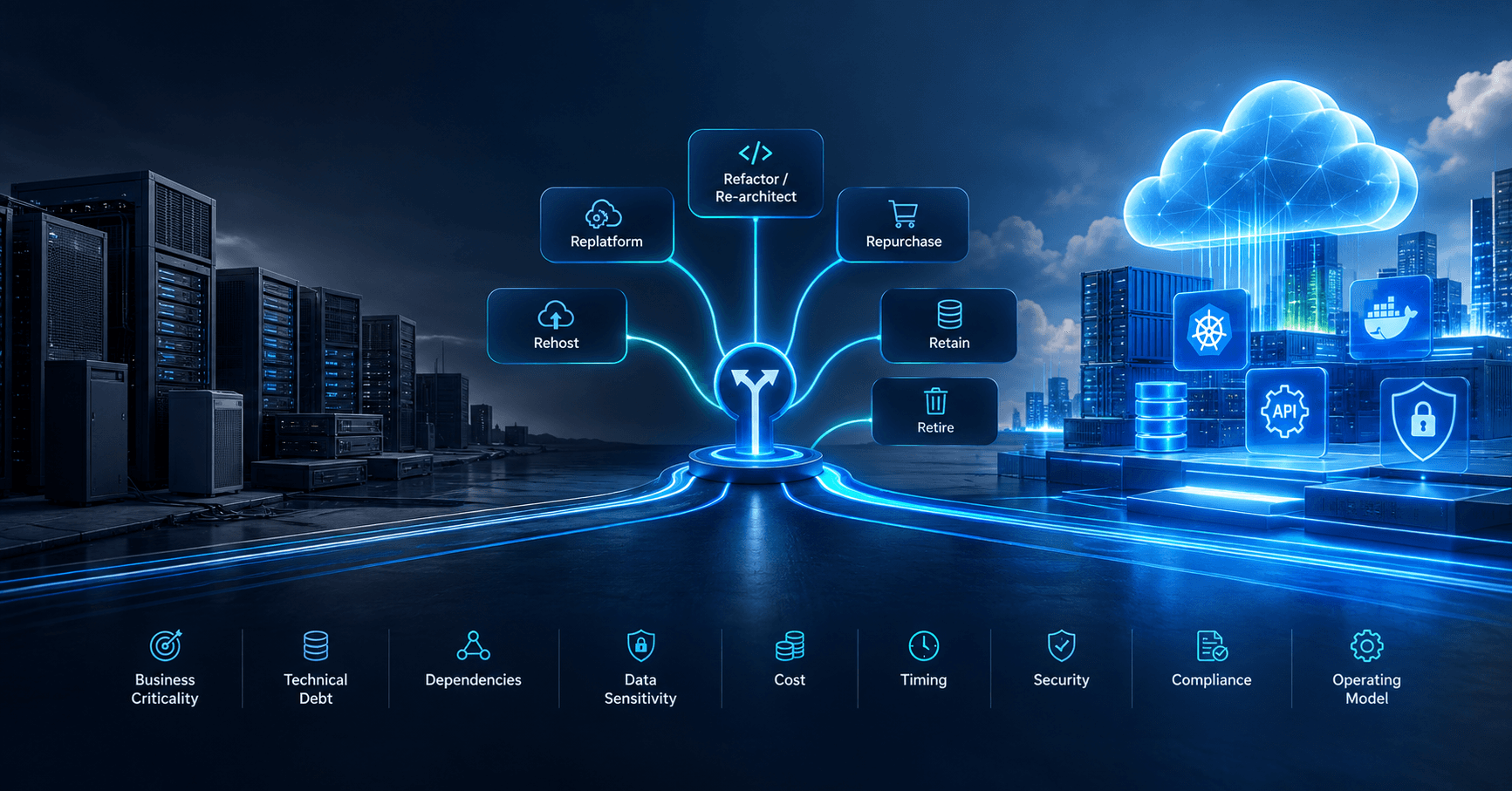
Cloud Computing
Decision Point for Choosing a Cloud Application Migration Strategy
Understand the decision point for choosing a cloud application migration strategy, with practical guidance on risk, cost, timing and architecture.
Sep 3, 2026
Read MoreReady to Transform Your Business?
Let's discuss how our expertise can help you achieve your goals