Cloud Computing
Cloud Migration for Small Business UK: Practical Guide
A practical guide to cloud migration for small business UK leaders, covering costs, timelines, security, architecture choices and common mistakes.

Tauseef Alam
Chief Technology Officer
- Published
- Aug 5, 2026
- Reading time
- 9 min read
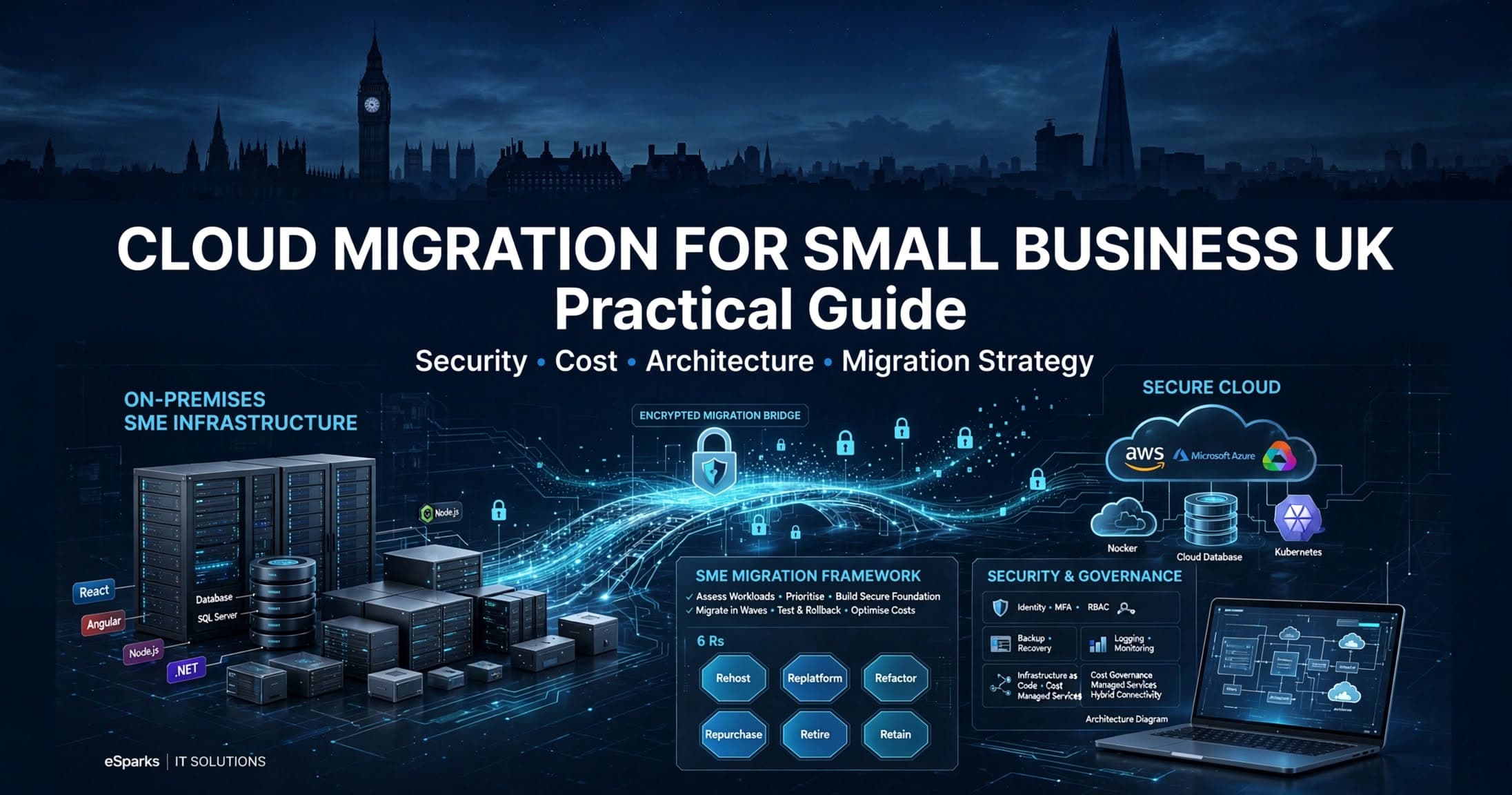
For most firms, cloud migration for small business uk means moving email, files, business applications, databases, backups, or custom software into cloud platforms in a way that improves resilience, security, and flexibility without disrupting day-to-day operations. The best approach is usually phased rather than big-bang: assess what you run today, prioritise low-risk workloads first, design security and backups early, and only modernise applications where there is a clear business case.
Key takeaways
- For most UK SMEs, the right cloud migration starts with choosing which workloads should move first, not with choosing a cloud provider.
- A low-risk migration plan usually combines rehosting for simple systems, refactoring for customer-facing apps, and retention of a few legacy workloads that should not move yet.
- Security in cloud migration depends more on identity, access control, backup design, logging and configuration discipline than on the platform alone.
- Typical small business cloud migrations take weeks for a narrow scope and several months for multi-system programmes, depending on application complexity, data quality and compliance needs.
- The biggest avoidable cloud migration costs usually come from underused resources, rushed cutovers, legacy dependencies and unclear ownership after go-live.
Why small UK businesses move to the cloud
Small businesses rarely migrate for technical fashion alone. In practice, the trigger is usually operational pain: ageing on-premise servers, rising support costs, unreliable remote access, software that is hard to update, or concerns about backup and cyber resilience. UK teams also increasingly need better support for hybrid working, multi-site access, and integrations across finance, CRM, customer support, and analytics tools. Cloud platforms can help, but only if the migration is tied to business priorities such as uptime, faster delivery, simpler support, and controlled growth.
The cloud can solve several problems well. Microsoft 365 and Google Workspace reduce the burden of managing mail servers and file shares. Azure, AWS, and Google Cloud provide infrastructure for web apps, databases, storage, monitoring, and disaster recovery. SaaS platforms can replace niche legacy tools that are expensive to host internally. For many SMEs, the real value is not only lower hardware dependency; it is faster provisioning, clearer backup patterns, easier patching, and the ability to standardise environments across development, test, and production.
That said, not every workload belongs in the cloud immediately. Some line-of-business systems have licensing constraints, unsupported dependencies, or performance assumptions built around local networks. A sensible migration starts by identifying which systems benefit most from cloud characteristics such as elasticity, managed services, and internet-based access, and which should be retained, replaced, or redesigned later.
Cloud migration for small business UK: what good looks like
A good migration is not simply “everything moved.” It is a measurable improvement in reliability, security, maintainability, and operational clarity. That usually means clear ownership for each application, documented recovery objectives, cost visibility, and environments that can be reproduced consistently. If your team cannot explain where the data lives, how access is granted, how systems are monitored, and how recovery works, the migration is not complete even if the servers are running in Azure or AWS.
For UK businesses, “good” also includes practical compliance and governance. Depending on sector, that may involve UK GDPR considerations, data processing agreements, retention policies, audit logging, encryption, and appropriate regional hosting choices. For many organisations, using the London region in Azure or AWS is operationally sensible, but residency decisions should be based on legal, contractual, and customer requirements rather than assumption alone. If you handle payment data, medical information, or sensitive employee records, security architecture needs to be defined before cutover, not added later.
A mature small-business setup often includes:
- Identity centralised through Microsoft Entra ID or another modern identity provider
- Multi-factor authentication for all privileged and remote access
- Role-based access control and least-privilege permissions
- Managed databases such as Azure SQL Database, Amazon RDS, or Cloud SQL where suitable
- Backups with tested restore procedures, not just backup jobs marked successful
- Logging and monitoring through tools such as Azure Monitor, CloudWatch, Microsoft Defender, or SIEM integrations
- Infrastructure as code using Terraform, Bicep, or CloudFormation for repeatability
- Cost controls such as budgets, tagging, reserved capacity review, and rightsizing
The decision framework: what to move, when, and how
The most reliable way to plan a migration is to catalogue workloads first. List every application, database, file store, server, integration, and scheduled task. For each item, note business criticality, users, peak periods, dependencies, authentication method, data sensitivity, backup status, operating system, licensing model, and whether the vendor supports cloud deployment. This exercise often reveals forgotten services such as print servers, file transfer jobs, legacy APIs, and local databases embedded inside desktop applications.
Next, group workloads into one of six common migration paths, sometimes called the 6 Rs:
- Rehost: move largely as-is to virtual machines in Azure, AWS, or GCP. Good for stable systems with minimal change tolerance.
- Replatform: make limited improvements, such as moving a self-hosted database to a managed database service.
- Refactor or re-architect: redesign parts of the application to use containers, serverless functions, queues, or managed identity.
- Repurchase: replace the system with SaaS, such as moving from an on-prem CRM to Salesforce, HubSpot, or Dynamics 365.
- Retain: keep the workload on-premise for now due to risk, latency, licensing, or hardware dependency.
- Retire: decommission unused services that no longer justify support effort.
Then prioritise in waves. A practical sequence for a small business is often: identity and endpoint controls first, then email and collaboration, then backups and disaster recovery, then low-dependency internal apps, and only after that the more entangled line-of-business systems. Customer-facing applications usually need extra planning around cutover, DNS, SSL certificates, session handling, and rollback. Where budgets are tight, we often recommend proving the operating model with one or two low-risk workloads before committing to a wider programme.
Architecture choices that matter more than vendor logos
For most SMEs, the biggest architecture decision is not Azure versus AWS. It is whether to rely on managed services or to recreate old server patterns in the cloud. Lifting several Windows servers into cloud virtual machines may be faster initially, but it can preserve patching overhead, backup complexity, and avoidable cost. By contrast, using managed services such as Azure App Service, Azure SQL Database, Amazon ECS Fargate, RDS, Azure Files, or managed Kubernetes where justified can reduce operational burden if the application fits.
A typical small business application stack today might include a React or Angular frontend, a .NET or Node.js API, a PostgreSQL or SQL Server database, object storage for uploads, and a CI/CD pipeline through GitHub Actions, GitLab CI, or Azure DevOps. In the cloud, that can be deployed as containerised services on Kubernetes or App Service, with CDN and WAF at the edge, secrets in Key Vault or Secrets Manager, and observability through OpenTelemetry plus the platform’s native monitoring tools. For a smaller team without platform engineers, simpler is often better: platform-as-a-service beats a complex Kubernetes estate unless there is a strong reason to run it.
Connectivity also deserves attention. If staff still depend on office-based systems, you may need site-to-site VPN, SD-WAN, or zero-trust access patterns during transition. File-heavy workloads, CAD assets, or latency-sensitive applications may need a hybrid setup for a period. DNS planning, IP allowlists, SMTP relay changes, and identity federation details can derail timelines if left until the end, so treat them as design items, not housekeeping.
Security, compliance, and backup: where migrations often fail
Cloud providers secure the underlying platform, but you remain responsible for identities, configurations, application security, data classification, and recovery design. The most common mistakes we see are permissive admin access, publicly exposed storage, weak key management, inconsistent environment configuration, and backups that have never been restored under realistic conditions. None of these are solved automatically by moving from a server room to the cloud.
A sound baseline for UK SMEs should include MFA everywhere, conditional access for risky sign-ins, separate admin accounts, encrypted data at rest and in transit, centralised logging, patch and vulnerability management, and clear joiner-mover-leaver processes. For custom software, secrets should be stored in managed secret stores rather than configuration files. Web applications should sit behind a WAF where appropriate, and external attack surface should be reviewed through regular scans and dependency checks. Container images should be scanned in the pipeline, and open-source packages should be pinned and monitored.
Backup strategy should be explicit about RPO and RTO. In plain terms: how much data can you afford to lose, and how quickly must you recover? A finance system may need tighter recovery objectives than a marketing asset repository. Consider immutable backup options where available, separate backup credentials from production credentials, and document restore runbooks. If ransomware resilience matters, test not only file recovery but full service recovery, including identity and database layers. For regulated sectors, keep evidence of controls, retention decisions, and access reviews.
Typical costs and timelines for small business migrations
Costs vary widely because “cloud migration” can mean anything from moving Microsoft 365 and shared files to redesigning several custom applications. A narrow project with low-complexity workloads may take a few weeks. A multi-system migration with legacy integrations, application updates, and data clean-up often takes several months. The main drivers are application complexity, quality of existing documentation, amount of data, security requirements, and the availability of internal decision-makers.
On cost, separate one-off migration effort from ongoing cloud spend. One-off costs typically include assessment, architecture, environment setup, data transfer, testing, cutover planning, and post-go-live support. Ongoing spend includes compute, storage, databases, backups, networking, security tooling, and support. For SMEs, the mistake is often assuming the cloud is automatically cheaper than on-prem. It can be, but only when environments are sized properly, shut down when not needed, and built around managed services instead of oversized virtual machines running 24/7.
To keep budgets under control, use a simple review model:
- Estimate baseline usage before migration, including CPU, memory, storage growth, and backup retention
- Start with right-sized environments rather than copying server specs blindly
- Use autoscaling where workloads are variable
- Tag resources by system, team, and environment to improve cost allocation
- Review storage classes and snapshot retention regularly
- Prefer reserved instances or savings plans only after usage patterns are stable
- Include third-party licensing and support costs in total cost of ownership
At Esparks, we advise clients to cost the operating model, not just the first invoice. A cheaper build that no one can manage safely is usually more expensive within a year than a well-governed setup from the start.
Common pitfalls and how to avoid them
The first major pitfall is treating migration as an infrastructure task only. Business applications have users, workflows, reporting dependencies, and exception cases that rarely appear in server inventories. If finance closes month-end in a specific system, or operations depend on a spreadsheet macro fed by a local database, those realities must shape sequencing and testing. Include business owners in planning, define acceptance criteria, and schedule cutovers around operational calendars.
The second pitfall is skipping application rationalisation. Many firms pay to migrate software they no longer need, then continue paying to support it in the cloud. Retire unused services early. Replace unsupported tools with SaaS when the process fit is acceptable. Only refactor custom applications when there is a clear reason, such as scalability, security, maintainability, or integration requirements. Not every internal app needs microservices; sometimes a clean monolith on a managed platform is the best answer.
The third pitfall is weak testing and rollback planning. Before cutover, test:
- Authentication and role permissions
- Data integrity after migration
- Performance under realistic usage
- Integrations with email, payment gateways, CRM, and reporting tools
- Backup and restore procedures
- Monitoring alerts and incident routing
- Rollback steps, DNS reversion, and communication responsibilities
Finally, avoid leaving ownership ambiguous after go-live. Define who manages cloud cost reviews, patching exceptions, access requests, backup checks, certificate renewals, and incident response. A migration is successful when the steady-state operation is clearer and safer than what existed before. That usually comes from disciplined design, phased delivery, and documentation that operations teams can actually use.
Frequently Asked Questions
What is the safest first step in cloud migration for a small business in the UK?
The safest first step is a structured assessment of your current systems, data, users, dependencies, and risks. Most small businesses should prioritise identity, backups, and a low-risk workload first rather than attempting a full migration in one cutover.
How long does cloud migration for a small business usually take?
A simple migration involving collaboration tools, file storage, or a small number of low-dependency systems may take a few weeks. A broader programme involving custom applications, database changes, compliance reviews, and integration testing often takes several months.
Is cloud migration always cheaper than keeping servers on-premise?
No, cloud migration is not automatically cheaper. Cloud is often more cost-effective when systems are right-sized, managed services reduce admin effort, and governance prevents waste, but poorly planned always-on resources can cost more than expected.
Which cloud platform is best for UK small businesses: Azure, AWS, or Google Cloud?
The best platform depends on your existing stack, team skills, security requirements, and vendor ecosystem. Many UK SMEs choose Azure because of Microsoft 365 and Windows integration, but AWS and Google Cloud can be equally strong choices for modern application, data, and automation workloads.
Work with Esparks IT Solutions
Planning a project around this? We work with businesses in the United States, Canada and the UAE, as well as the UK and Australia. Explore our Cloud Computing services and portfolio, estimate your project cost, or book a free call.
Written by

Tauseef Alam
Chief Technology Officer
Chief Technology Officer at Esparks IT Solutions. Writes from the team's own delivery work across software, cloud, DevOps and security.
Related topics
Continue reading
More in Cloud Computing
Cloud Computing
SQL Server to PostgreSQL Migration: Business Guide
A practical guide to sql server to postgresql migration, covering planning, code changes, risks, timelines, costs, and execution choices.
Oct 18, 2026Read

Programming
RDP Thin Client Solution for Business: UK Guide
A practical UK guide to choosing an rdp thin client solution for business, covering architecture, security, costs, rollout steps and common pitfalls.
Sep 18, 2026Read
AI & Machine Learning
Build vs Buy AI Solution: A Practical Decision Guide
How to decide build vs buy ai solution for your business: costs, timelines, risks, architecture, and a practical framework for leaders.
Sep 10, 2026Read
Work with us
Have a system to build, fix or scale?
Tell us what you are working on and where it hurts. We will tell you how we would approach it.